A free online alternative to PyMOL
PyMOL is the workhorse of structural biology figures, but it is a desktop program that has to be installed and, for the full Incentive build, licensed. When you only need to look at a structure, measure a distance or send a view to a colleague, MolViewer does the common tasks in the browser: free, open source, no install and no account.
Open ubiquitin (1UBQ) as a cartoon
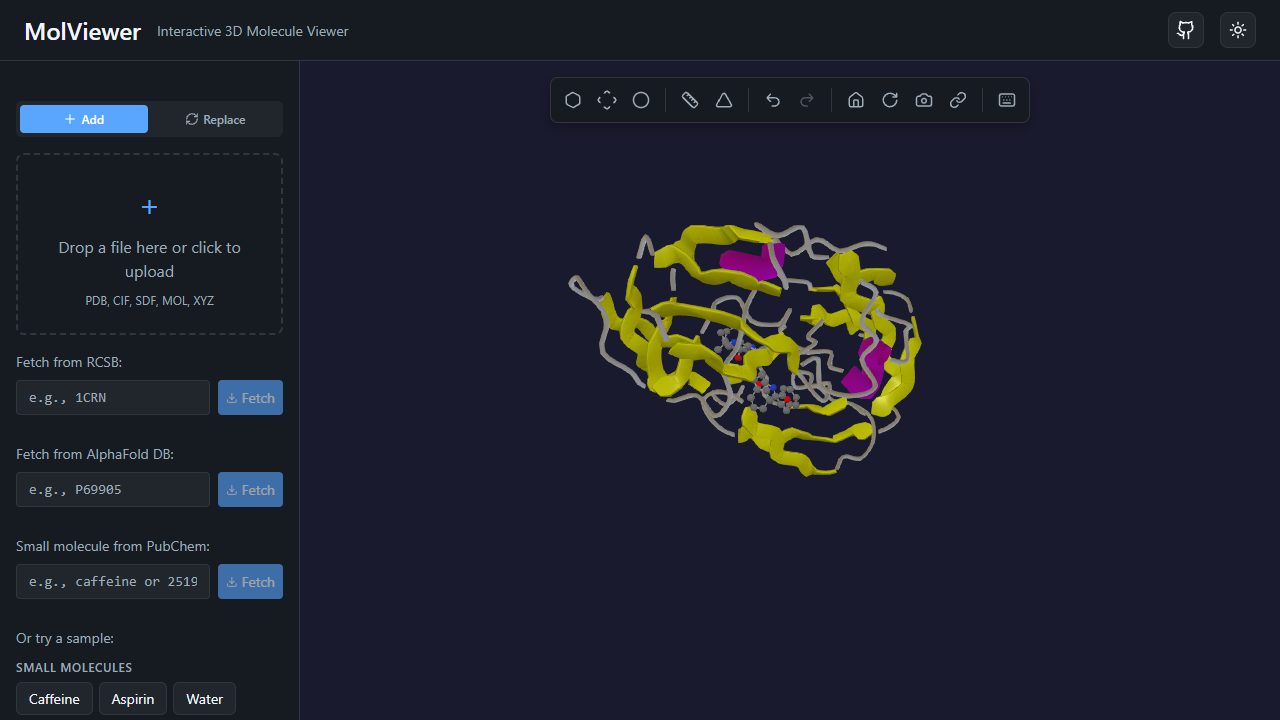
Common PyMOL tasks in MolViewer
| In PyMOL | In MolViewer |
|---|---|
fetch 1ubq | Open /pdb/1UBQ or type the ID in the RCSB box |
show cartoon | Cartoon representation |
dss and color by ss | Secondary-structure color scheme, from the file or estimated from backbone angles |
spectrum b | B-factor color scheme (also shows AlphaFold pLDDT) |
spectrum count | Rainbow color scheme, N- to C-terminus |
show surface | Van der Waals or solvent-accessible surface |
distance, angle, dihedral | Measurement tools, or right-click an atom and choose Measure From Here |
label | Right-click an atom and choose Add Label |
png | PNG export at 1x, 2x or 4x, optional transparent background |
| Save a session | Save in the browser, or create a short share link anyone can open |
Where MolViewer helps
- Nothing to install. Useful on locked-down lab or classroom computers, Chromebooks and phones.
- Links instead of files. A share link restores the structures, camera, measurements and labels, so a student or reviewer sees exactly your view. You can also embed a live viewer on a web page with an
<iframe>. - Sequence and structure together. Click a residue in the sequence viewer to find it in 3D.
- AlphaFold by accession. Load a predicted model such as p53 and color it by confidence.
Where PyMOL is the better tool
Be clear about the limits. PyMOL has a command language and a full Python API for scripting and automation; MolViewer has neither (a selection language is planned). PyMOL ray-traces publication-quality images, superposes structures with align and super, displays electron density maps, makes movies from trajectories, and has a large plugin ecosystem. MolViewer cannot open PyMOL .pse session files. For those jobs, keep PyMOL. The open-source build is free, and Schrödinger offers free educational-use builds to teachers and students for coursework, though not for research or publication.
Many people use both: PyMOL for final figures and analysis scripts, MolViewer for quick looks, teaching and sharing. See the comparison of web viewers if you need maps or trajectories in a browser.
Frequently asked questions
- Is there an online version of PyMOL?
- PyMOL itself is a desktop application for Windows, macOS and Linux. MolViewer is a separate, free web viewer that covers everyday tasks such as fetching a PDB entry, cartoon and surface views, coloring, measurements and image export.
- Can MolViewer run PyMOL scripts or open .pse files?
- No. MolViewer has no scripting or command language yet and cannot read PyMOL session files. Open the underlying PDB or mmCIF file instead and rebuild the view with a few clicks.
- Are MolViewer images good enough for a paper?
- PNG export at up to 4x screen resolution with a transparent background works well for slides, posters and teaching material. For ray-traced figures with fine control over lighting and shadows, PyMOL or ChimeraX is still the better choice.
- Is MolViewer free for research and commercial use?
- Yes. MolViewer is open source under the MIT license, which permits academic, commercial and teaching use.
Open ubiquitin (1UBQ) as a cartoon